Airgapped · Deployable · Federated · XMPP

Secure messaging for sensitive work.

Parlour is an XMPP server for airgapped and deployable networks. It handles messaging, voice, video and PSTN calls, with customisable federation. People sign in with their existing directory account from any standards-compliant XMPP client, and its security labels are built on STANAG 4774/4778 for data-centric security (DCS). Parlour Systems provides help with configuration and installation, as well as 24/7 support.

  • Runs airgapped
  • ABAC by design
  • Federates over standard XMPP
  • Deploys with one command
  • Voice, video and PSTN calls
  • 24/7 support
  • Works with standard XMPP clients

Labelled to STANAG 4774/4778

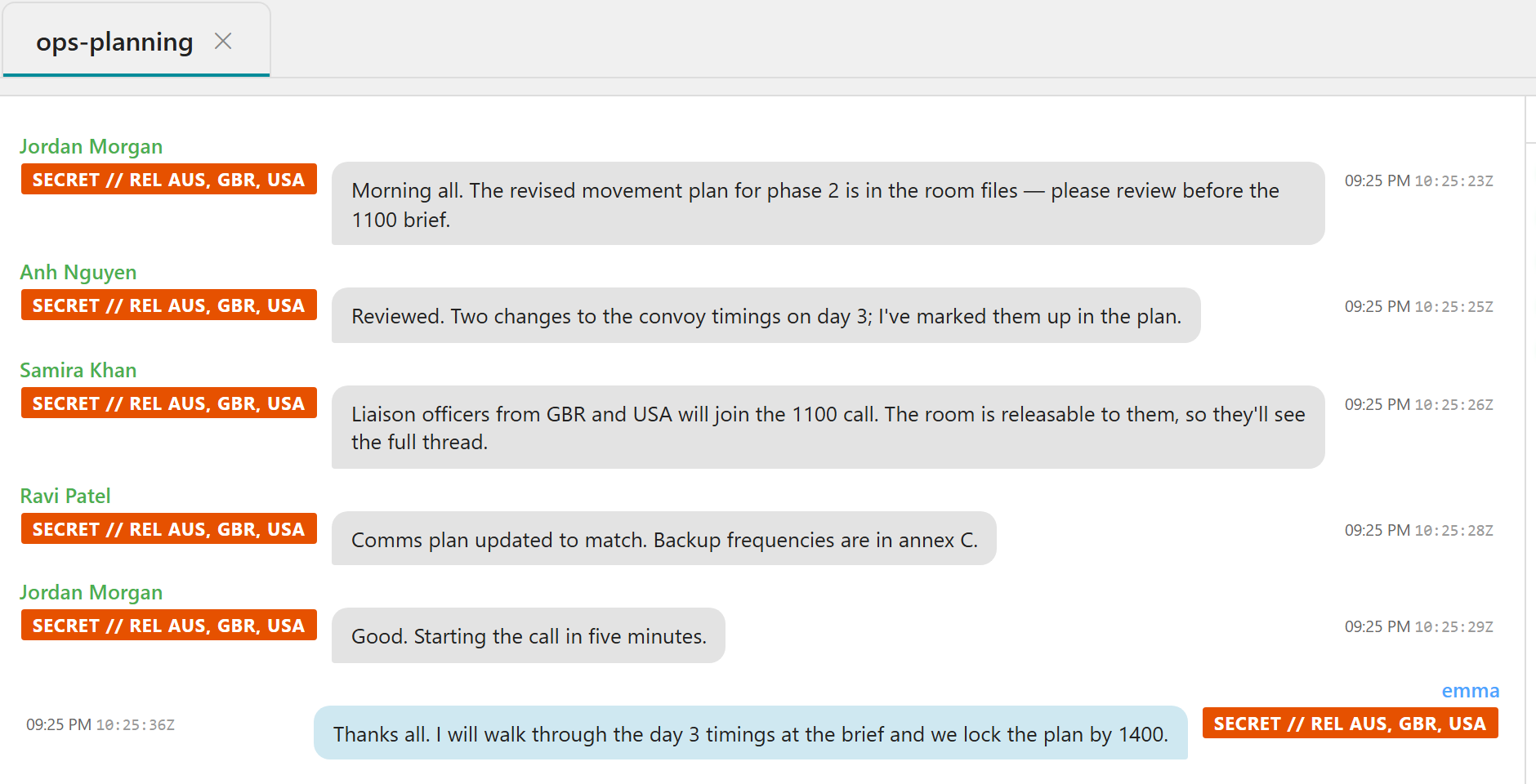
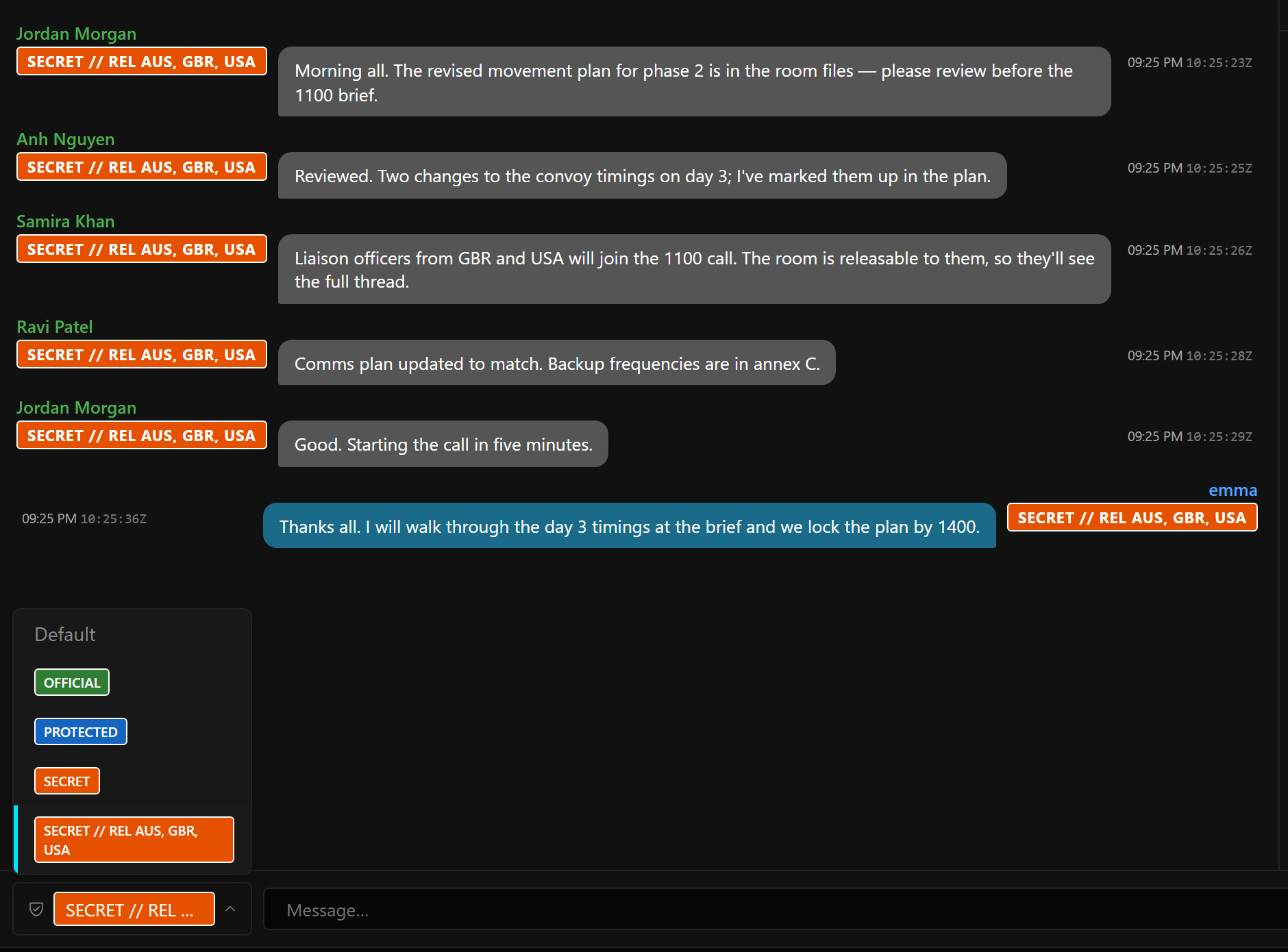
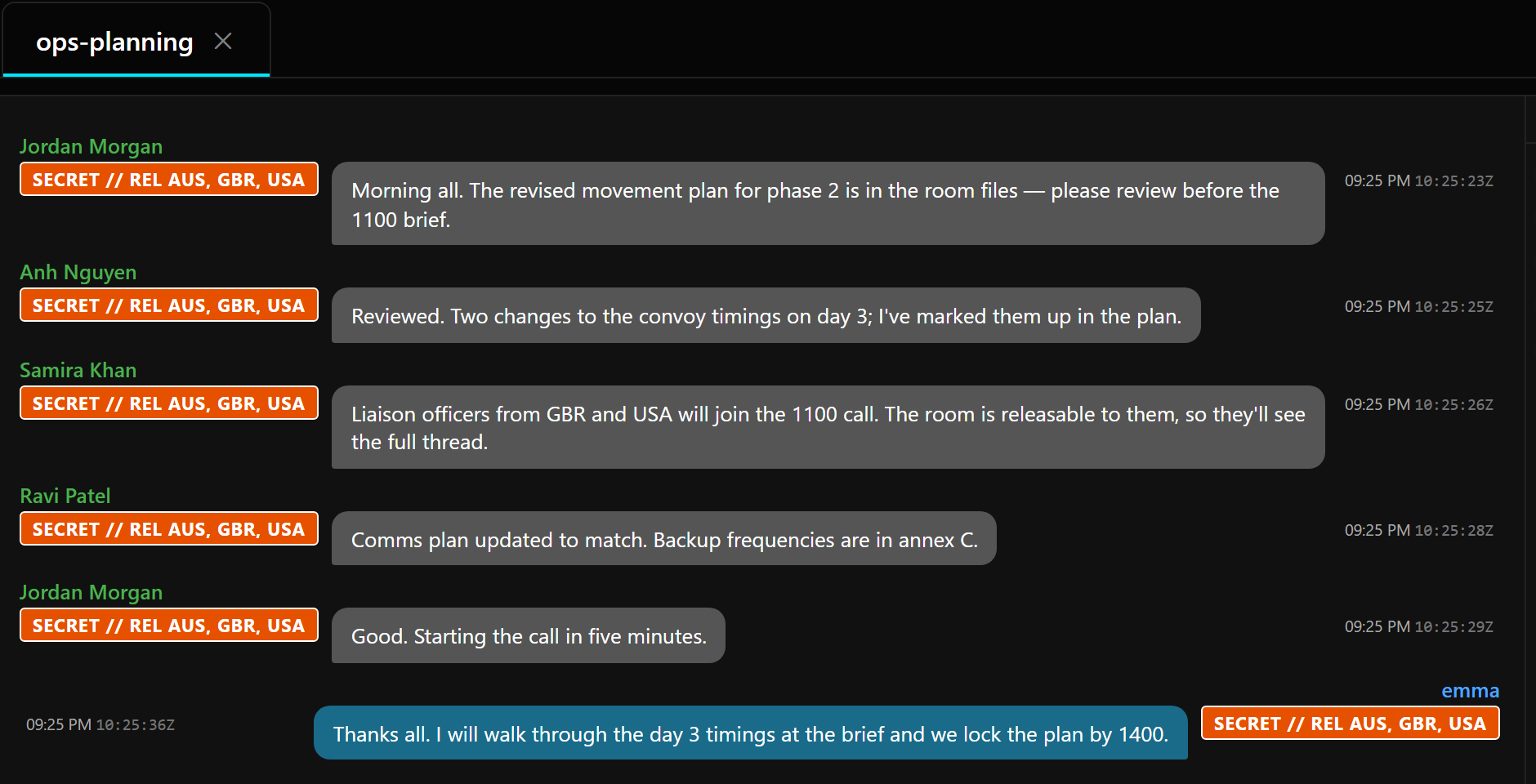
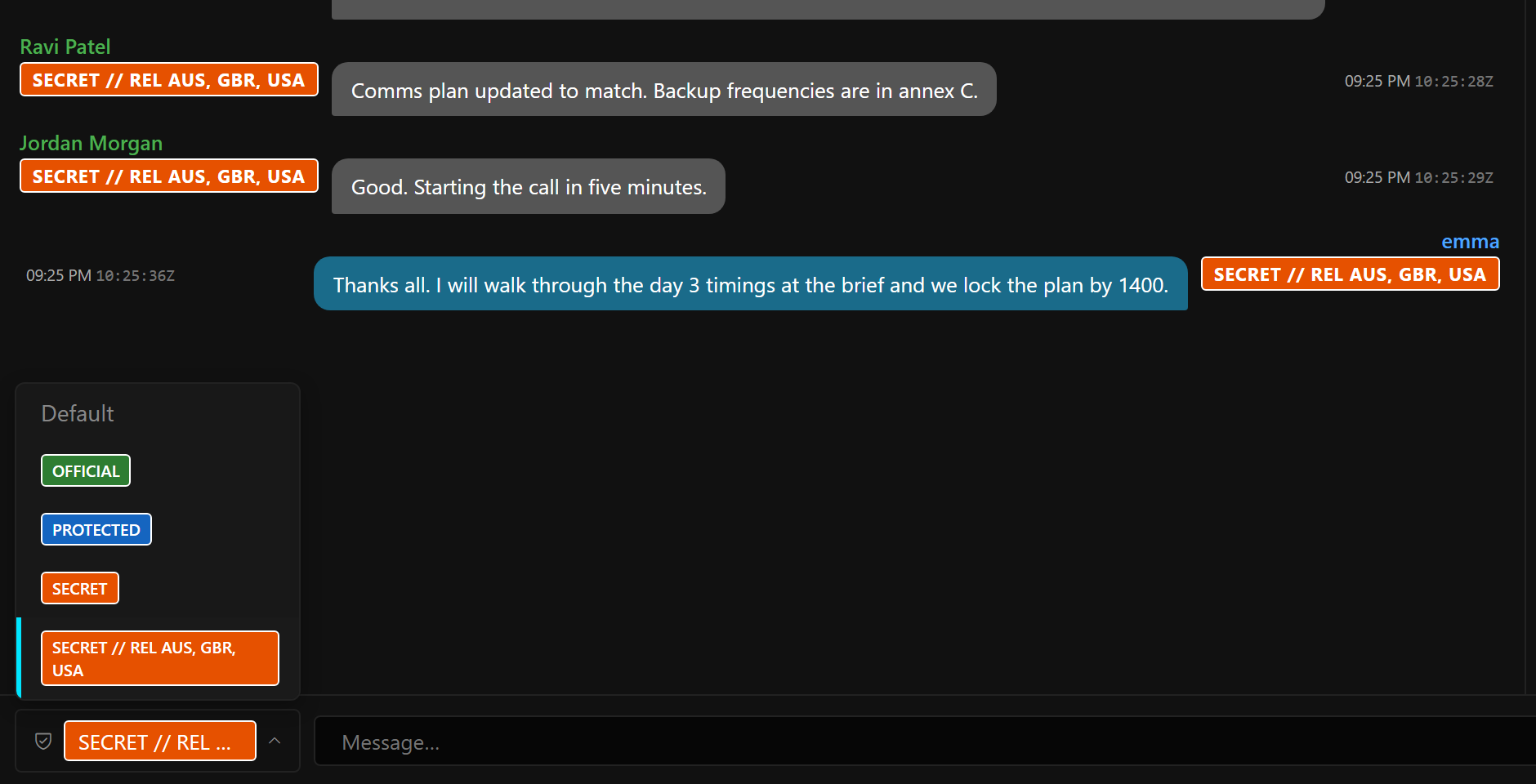
The ops-planning room, with messages labelled SECRET // REL AUS, GBR, USA A label picker open, offering OFFICIAL, PROTECTED, SECRET and SECRET // REL AUS, GBR, USA The same labelled conversation in a light theme

Supported standards

  • XMPP
  • NATO ADatP-4774 / 4778 labels
  • Kerberos single sign-on
  • Active Directory · LDAPS
  • TLS 1.3
  • WebSocket & BOSH
  • WebRTC voice & video
  • SIP for PSTN

The platform

An XMPP server, and round-the-clock support.

Parlour uses standard XMPP, so it works with the clients and servers you already have. Parlour Systems can help you design and deploy it, and provides 24/7 operational support.

Parlour

The server

For organisations that need to know exactly who can read what, and want to run the server themselves.

  • Enforces security labels and clearances on messages and rooms
  • Attribute-based access control (ABAC) by design, using your directory attributes
  • Active Directory sign-in, with Windows single sign-on
  • Federates with partner servers, through relays if you need them
  • Voice and video calls, and PSTN calls through a SIP bridge
  • Runs on one server or as a cluster
  • Admin dashboard, audit log and message archive

24/7 support

XMPP and chat solutions

Getting chat working on a closed network usually takes more than an install. Parlour Systems works with your team on whichever parts you want help with.

  • Working out the architecture and sizing
  • Deployment, including airgapped and deployable sites
  • Connecting to your directory, PKI and existing XMPP servers
  • Setting up federation with partners and coalition networks
  • Writing label policy and access rules
  • Choosing and rolling out XMPP clients
  • 24/7 operational support
Choosing a security label: OFFICIAL, PROTECTED, SECRET and SECRET // REL AUS, GBR, USA, above a labelled conversation

Security labels

Security labels built on STANAG 4774/4778.

Labels come from the organisation's own catalogue. Parlour checks each message's label against the room and each reader before anyone sees the message, and the label stays with the message when it crosses a federated XMPP link.

  • Import labels from an XML SPIF
  • People only see the labels the room allows
  • Clearance and releasability are checked for each reader

Security

Designed around who's cleared to see what.

Parlour knows what clearance each person holds and checks it as a message moves through the system.

STANAG 4774/4778 security labels

Classifications and caveats follow NATO ADatP-4774, with cryptographic binding to ADatP-4778. The label stays with the message, including over federated links.

Clearances, caveats and nationality

People only see a room if their clearance, caveats and releasability allow it. Change someone's clearance and they're removed from any rooms they no longer qualify for.

ABAC by design

Write rules using directory groups, attributes and connection details to control who can use rooms, the dashboard and the archive. A preview shows why each decision came out the way it did.

Tamper-evident audit

Admin changes and sign-ins go into a hash-chained log. You can verify it whenever you like and export it for review.

Two-person archive access

Searching the archive takes its own permission and can require a second person's approval. Readers only see what they're cleared for.

Encrypted in transit and at rest

TLS 1.3 throughout, with certificate rules you can set per partner. Archived messages and stored secrets are encrypted with a key you hold.

Features

Core capabilities

Rooms

Persistent group rooms with owners, moderators and read-only roles, across as many conference services as you need.

Voice and video

One-to-one and group calls with screen sharing, hosted on your own server. When people are on the same network, media goes directly between them.

PSTN calling

A SIP bridge connects calls to the public phone network, so someone on an ordinary phone can join.

Windows single sign-on

Domain-joined PCs can sign in with Kerberos if the client supports it. Directory passwords still work for everyone else.

Federation and relays

Connect to partners directly or through a relay. Labels and routing rules apply in both directions.

Low-bandwidth links

Mirror individual rooms to remote sites whose links can't carry full federation.

Your directory

Users, groups, phone numbers and nationality come from Active Directory, so there's no second user database to look after.

Browser access

Parlour serves XMPP over WebSocket and BOSH for browser clients. It can host a web client itself, or you can serve one from IIS or Apache.

Other XMPP servers

Federates with standards-compliant servers, including Isode M-Link, so you can join networks that already exist.

How it fits

Runs entirely on your own network.

Parlour runs next to your directory and certificate authority. People connect with XMPP clients on the desktop or in a browser. Partner organisations can only reach it over links you've set up.

  • Identity: Active Directory, LDAPS, Kerberos
  • Certificates: your own PKI and revocation lists
  • Boundary: nothing leaves unless a rule allows it
Users on desktop and web XMPP clients connect to a Parlour cluster inside your network, which uses your directory and PKI, and federates with partner servers through a relay. Your network XMPP clientdesktop XMPP clientbrowser Parlourcluster ActiveDirectory Your PKIcerts · CRLs Relayoptional PartnerXMPP server CoalitionParlour
Labels and access rules apply on every link, inside your network and across the boundary.

Deployment

One command, whether it's one server or many.

Describe the server in a file and run one command. When something changes, edit the file and run it again.

Standalone

One file covers the domain, directory, labels, access rules, web client, Windows sign-in, federation and TLS policy.

$ ./deploy.sh --config site.yaml

Fleet

One topology file describes all your servers. The tool sets up certificates, clusters and two-way federation, then checks it all works.

$ node deploy.js fleet.json

High availability

Run a domain across several nodes with a shared, replicated database. If a node goes down, conversations carry on.

$ ./deploy.sh --yugabyte

No internet needed.

Not to install it and not to run it. The offline bundle has everything in it, and nothing calls home.

Get in touch

Who it's for

For organisations that can't risk their conversations in someone else's hands.

Defence & coalition

Labelled messaging across national and coalition networks, with releasability checked at every hop.

Government

Self-hosted chat that fits the directories and PKI you already run.

Critical infrastructure

Operations chat that keeps working on isolated networks and thin links.

Regulated enterprise

Access control, archiving and audit, without a third-party cloud.

Questions

Frequently asked

Is Parlour a cloud service?

No. It runs on your servers, inside your network. Parlour Systems never hosts your messages, and it doesn't need an internet connection to install or run.

Does it work with existing XMPP servers?

Yes. Parlour uses standard XMPP and federates with other compliant servers, including Isode M-Link. Security labels go across the link with the message.

Which directories and sign-in methods are supported?

Active Directory or any LDAP directory over LDAPS. Domain-joined PCs can use Windows single sign-on (Kerberos), and client certificates work too. There's also a separately held break-glass account for emergencies.

Does it do voice, video and phone calls?

Yes. Parlour hosts one-to-one and group voice and video calls with screen sharing on your own servers. People on the same network connect directly. A SIP bridge connects to the public phone network (PSTN), so someone on an ordinary phone can join.

Which label standards do you support?

NATO ADatP-4774 with ADatP-4778 binding, and you can import labels from an XML SPIF. Encodings include ESS, STANAG 4774 and IC-ISM, so they'll match what your other systems expect.

Will it help with accreditation?

It should. Audit, access control, encryption and separation of duties are built in and documented. Accreditation is still your accreditor's call, so get in touch with what they're asking for and Parlour Systems can go through it with you.

Which clients can people use?

Any standards-compliant XMPP client can sign in and chat. Choosing security labels, Windows single sign-on and calls all need a client that supports them, and Parlour Systems can help you find the right one.

Do you offer 24/7 support?

Yes. Parlour Systems also helps with anything from the first design through to running it: architecture, deployment on airgapped and deployable networks, connecting your directory and PKI, federation, and label policy. Get in touch with the details of your setup.
Get in touch

What are you working on?

A bit about your organisation and what you need is plenty to start with. Parlour Systems can set up a demonstration on infrastructure like yours.

Or email Parlour Systems directly.